

z-index not working?
Updated
•2 min read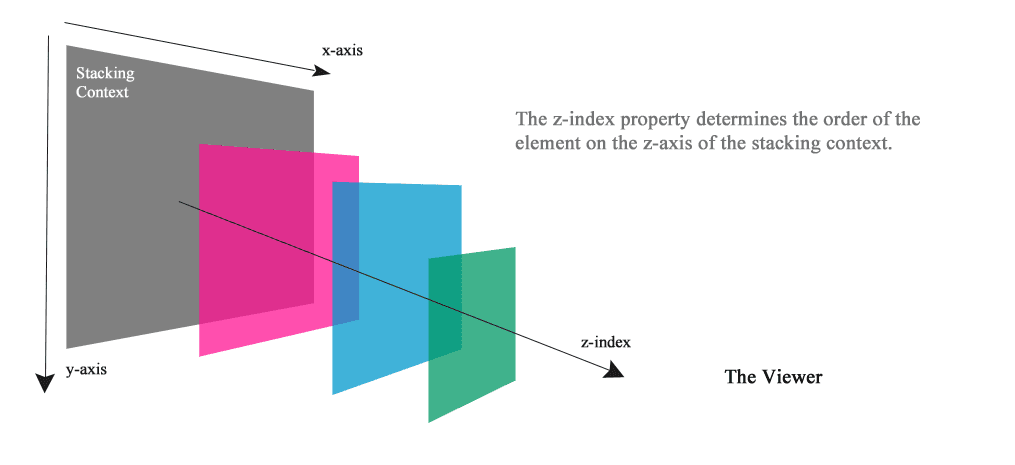
A
Hi, my name is Anh Nhat Tran (Nana). I'm a Backend Developer, a book enthusiast, and a powerlifter. My work mostly focused on web development using Javascript, Go, and SQL.
What is z-index?
The z-index property specifies the stack order of an element.
Usage
An element with greater stack order is always in front of an element with a lower stack order.
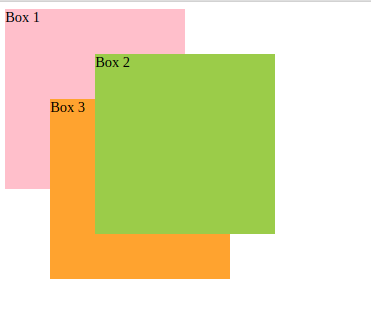
z-indexonly works on positioned elements (position: absolute, position: relative, position: fixed, or position: sticky) and flex items (elements that are direct children of display:flex elements).If two positioned elements overlap without a z-index specified, the element positioned last in the HTML code will be shown on top.
<!--
If two positioned elements overlap without a z-index specified, the element positioned last in the HTML code will be shown on top.
Box 3 is on top of box 1 because it is positioned last in the HTML.
Box 2 is on top of box 3 because its z-index is greater than box 3.
-->
<div class='container'>
  <div class='box box1'>Box 1</div>
  <div class='box box2'>Box 2</div>
  <div class='box box3'>Box 3</div>
</div>
.container {
  position: relative;
}

.box {
  width: 200px;
  height: 200px;
}

.box1 {
  background-color: pink;
  position: absolute;
}

.box2 {
  background-color: yellowgreen;
  position: absolute;
  top: 50px;
  left: 100px;
  z-index: 3;
}

.box3 {
  background-color: orange;
  position: absolute;
  top: 100px;
  left: 50px;
}
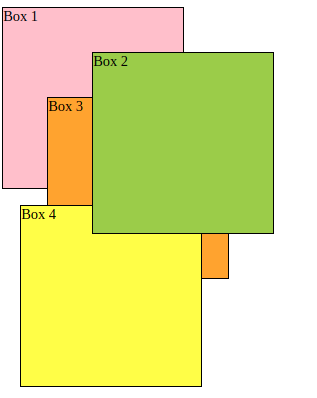
- If two positioned elements overlap, element 1 has a child element A (z-index: 3), element 2 (
z-index: 2) has a child element B (z-index: 4). A is on top of B even itsz-indexis less than B (3 < 4) due to thez-indexof the parent element 1.
<!--
If two positioned elements overlap without a z-index specified, the element positioned last in the HTML code will be shown on top.
Box 3 is on top of box 1 because it is positioned last in the HTML.
Box 2 is on top of box 3 because its z-index is greater than box 3.
-->
<div class='container'>
  <div class='box box1'>Box 1</div>
  <div class='box box2'>Box 2</div>
  <div class='box box3'>Box 3</div>
</div>

<!--
Even box 4 has z-index: 4 is greater than box 2 (z-index: 3), box 2 still on top of box 4 due to z-index of `container2` is 2
-->
<div class='container2'>
  <div class='box box4'>Box 4</div>
</div>
.container {
  position: relative;
  height: 220px;
}

.box {
  width: 200px;
  height: 200px;
  border: 1px solid;
  position: absolute;
}

.box1 {
  background-color: pink;
}

.box2 {
  background-color: yellowgreen;
  top: 50px;
  left: 100px;
  z-index: 3;
}

.box3 {
  background-color: orange;
  top: 100px;
  left: 50px;
}

.container2 {
  position: relative;
  height: 220px;
  z-index: 2;
}

.box4 {
  background-color: yellow;
  top: 0;
  left: 20px;
  z-index: 4;
}
Code demo: Codepen